
Command Prompt on Right-Click

2K Views
0 Replies
1 min read
Method I. Manually edit the registry:

1.Start > Run

2.Enter "regedit" and hit Enter

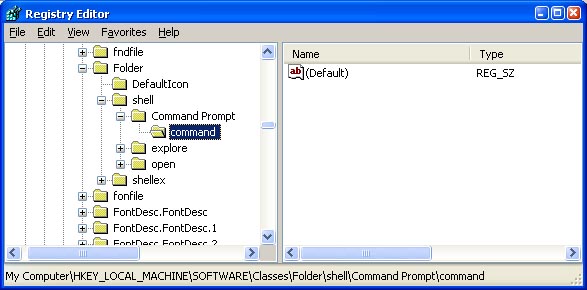
3.Expand to "HKEY_LOCAL_MACHINE\SOFTWARE\Classes\Folder\shell"

4.Right-click on "shell" and select New > Key

5.Make sure a new key is created under "shell". Change the name of this key to "Command Prompt"

6.Right-click on this new key "Command Prompt" and select New > Key

7.Change the name of this key to "command"


Here's what we should have:


1.Double-click on the "(Default)" text on the right window to bring up the edit box

2.Enter this text into the Value Data field:
cmd.exe "%1"

3.Click OK and close the registry.
11 Replies

another good information... keep updating with more tricks naveen
Good source of information on command prompt. Thanks for sharing this.
Dear Friend,
You have chosen this topic wisely. This is knowledge information to spread the awareness about the Computers. Hope this topic will put some light.
Keep writing this kind of knowledgeable article.

Regard's
Bharat.
niceeeeeeeeeeeeeeeeeeeeeeeeeeeeeeeeeeeeeeeeeeeeeeeeeeeeeeeeeeeeeeeeeeeeeeeeeeeeeeeeeeeeeeeeeeeeeeeeeeeeeeeeeeeeeeeeeeeeeeeeeeeeeeeeeeeeeeeeeeeeeeeeeeeeeeeeeeeeeeeeeeeeeeeeeeeeeeeeeeeeeeeeeeeeeeeeeeeeeeee
forummmmmmmmmmmmmmmmmmmmmmmmmmmmmmmmmmmmmmmmmmmmmmmmmmmmmmmmmmmmmmmmmmmmmmmmmmmmmmmmmmmmmmmmmmmmmmmmmmmmmmmmmmmmm............................................................................................................
this is very good information. I wanna suggest you that you make suvery that what are the common probs faced by people with a computer.For example desktop computers are there, if the website doesnt load properly, then there will be some destructions and finally leads to 52 error, finally while working the system ahnds for ever 5 mins or 2 mins.there will be lot of disturbance and intruption in the work,and sometime system even go in prob.
very nice piece of information shared in detail. Thanks for sharing.
Learn all of computer,mail errors,job tips and get help for free.

http://pctells.blogspot.com/
http://mailerror.blogspot.com/
http://faqall.blogspot.com/
http://net2go.blogspot.com/http://interview2me.blogspot.com/
Oh!I wonder a one year old thread is brought back alive!!! :ohmy: :ohmy: :ohmy:
very good piece of information shared in full detail. Thanks for sharing. Keep sharing more...
Useful information. But try adding up few more tricks which can be useful and needed next time.

Topic Author

N

naveen

@zealousman85

Topic Stats

Created Sunday, 29 November 2009 17:14
Last Updated Tuesday, 30 November -0001 00:00
Replies 0
Views 2K
Likes 0

Share This Topic